
Executive Summary
Executive Summary
A large enterprise organization operating across multiple business units and geographies undertook a strategic initiative to migrate its entire on-premises IT estate to Microsoft Azure. The legacy infrastructure — a mix of physical servers, tightly-coupled monolithic applications, and manual operational processes — had become a critical bottleneck to growth, agility, and competitive differentiation.
Over an 18-month engagement spanning four structured migration phases, the organization decommissioned 320 on-premises servers, containerized 47 applications, and re-platformed its primary SQL Server workload to Azure SQL Managed Instance. A fully automated CI/CD platform built on Azure DevOps replaced 6-to-8-week manual release cycles with multiple deployments per day. The result was a 40% reduction in total infrastructure cost, a jump in availability from 99.5% to 99.99%, and deployment lead times compressed from weeks to under two hours.
Key Outcomes at a Glance
- 40% infrastructure cost reduction
- 99.99% availability
- Multiple deployments per day
- Zero data loss during migration
- Full SOC 2 Type II compliance on Azure
Client Overview
Client Overview
The organization’s CTO articulated the strategic imperative: “Our on-premises model was preventing us from moving at the speed the business required. We needed elastic scale, global reach, and the ability to innovate without infrastructure constraints.”
- Organization Type
- Global enterprise with 5,000+ employees across 12 countries
- IT Footprint
- 320 on-premises servers, 80+ applications, 15 TB of operational data
- Key Business Drivers
- Digital transformation mandate, M&A integration, global expansion, regulatory compliance
The Challenge
The Challenge
The existing on-premises environment presented significant operational and strategic challenges across four dimensions
-
Infrastructure Rigidity & Cost
- Capital expenditure cycles of 3–5 years with limited flexibility to scale capacity up or down
- Server utilization averaging only 22%, representing substantial stranded investment
-
Availability & Resilience
- Aging hardware contributing to unplanned outages averaging 43 hours per year
- Disaster recovery limited to warm standby in a single geographic region
- RTO of 8 hours and RPO of 4 hours — inadequate for customer SLAs
-
Security & Compliance
- Fragmented identity management across Active Directory domains and legacy LDAP directories
- Absence of unified threat detection and SIEM capability
- Manual audit trails insufficient for emerging data sovereignty requirements
-
Developer Velocity
- Monolithic architecture preventing independent service deployment
- Release cycles of 6–8 weeks due to manual testing and deployment gates
- No self-service infrastructure or CI/CD automation for development teams
Current State Architecture
Current State Architecture
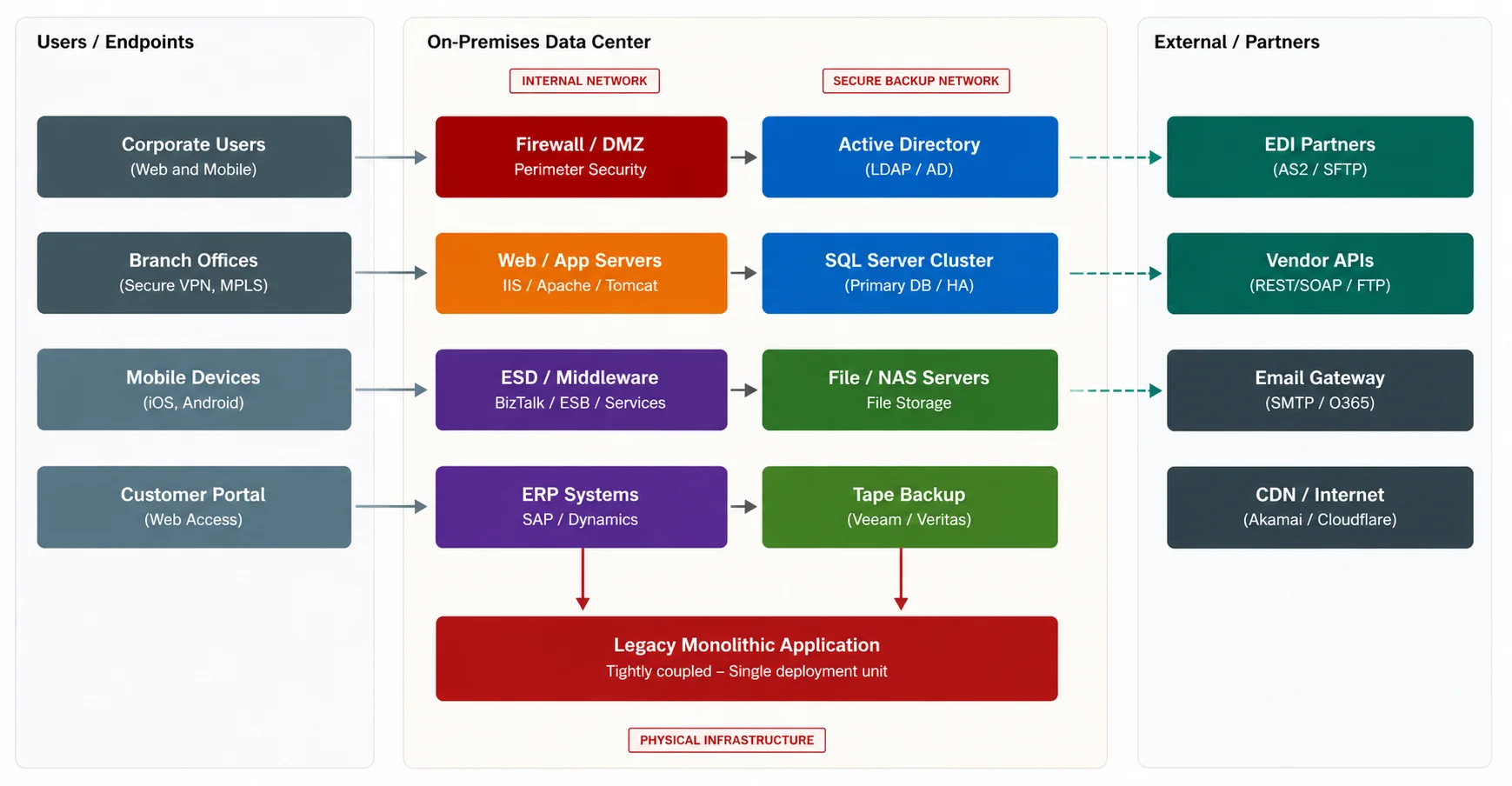
The diagram below illustrates the pre-migration architecture, characterized by a perimeter-based security model, tightly coupled application tiers, and no automated deployment capability.
Azure Modernization
Azure Modernization
The migration and modernization program was structured around four strategic pillars, each directly addressing the constraints identified in the current-state assessment.
-
Pillar 1 - Rehost, Replatform, Refactor (the 3R Strategy)
- Rehost (Lift-and-Shift): 60 workloads — migrated to Azure VMs and App Service to meet decommission deadlines while preserving application logic.
- Replatform: 30 workloads — adopted managed Azure services (Azure SQL Managed Instance, Redis Cache, Service Bus) to eliminate patching overhead with minimal code changes.
- Refactor: 47 workloads — rearchitected as containerized microservices on Azure Kubernetes Service (AKS), enabling independent scaling and continuous delivery.
-
Pillar 2 — Zero-Trust Security Architecture
- Microsoft Entra ID (Azure AD) deployed as the unified identity plane — SSO and phishing-resistant MFA across all workloads.
- Azure Key Vault centralized secrets, certificates, and encryption keys — eliminating hard-coded credentials across 47 repositories.
- Microsoft Defender for Cloud provides continuous CSPM and workload protection, achieving a Secure Score of 87% within 90 days.
- Microsoft Sentinel deployed as the SIEM/SOAR platform, reducing mean-time-to-detect from 18 hours to under 2 hours.
-
Pillar 3 — Modern Data Platform
- Azure Data Lake Storage Gen2 as the enterprise data lake, ingesting structured and unstructured data from source systems via Azure Data Factory.
- Azure Synapse Analytics replacing a heavily customized on-premises data warehouse with petabyte-scale SQL and Spark analytics.
- Microsoft Purview provides end-to-end data governance, lineage tracking, and automated data classification.
- Power BI Premium delivers self-service analytics to 1,200+ business users, replacing 34 legacy Crystal Reports deployments.
-
Pillar 4 — Azure DevOps CI/CD Automation
- Azure DevOps was selected as the unified platform for source control, build pipelines, release pipelines, artifact management, and work item tracking. This is described in detail below.
Target State Architecture
Target State Architecture
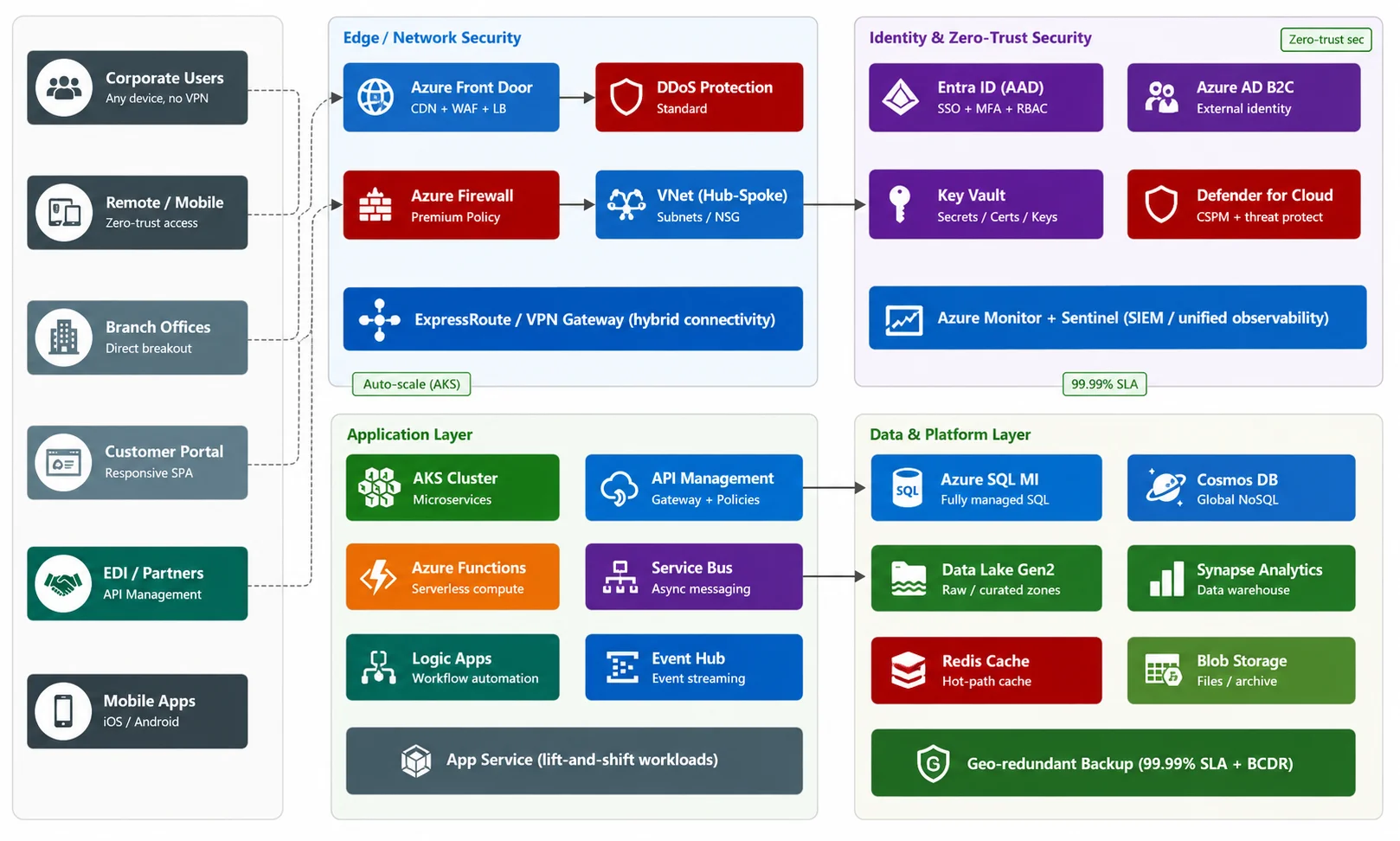
The post-migration Azure architecture adopts a hub-spoke network topology, zero-trust security perimeter, and cloud-native managed services for compute, data, and integration. All workloads are deployed across two Azure regions for active-passive high availability.
End-to-End Data Flow
End-to-End Data Flow
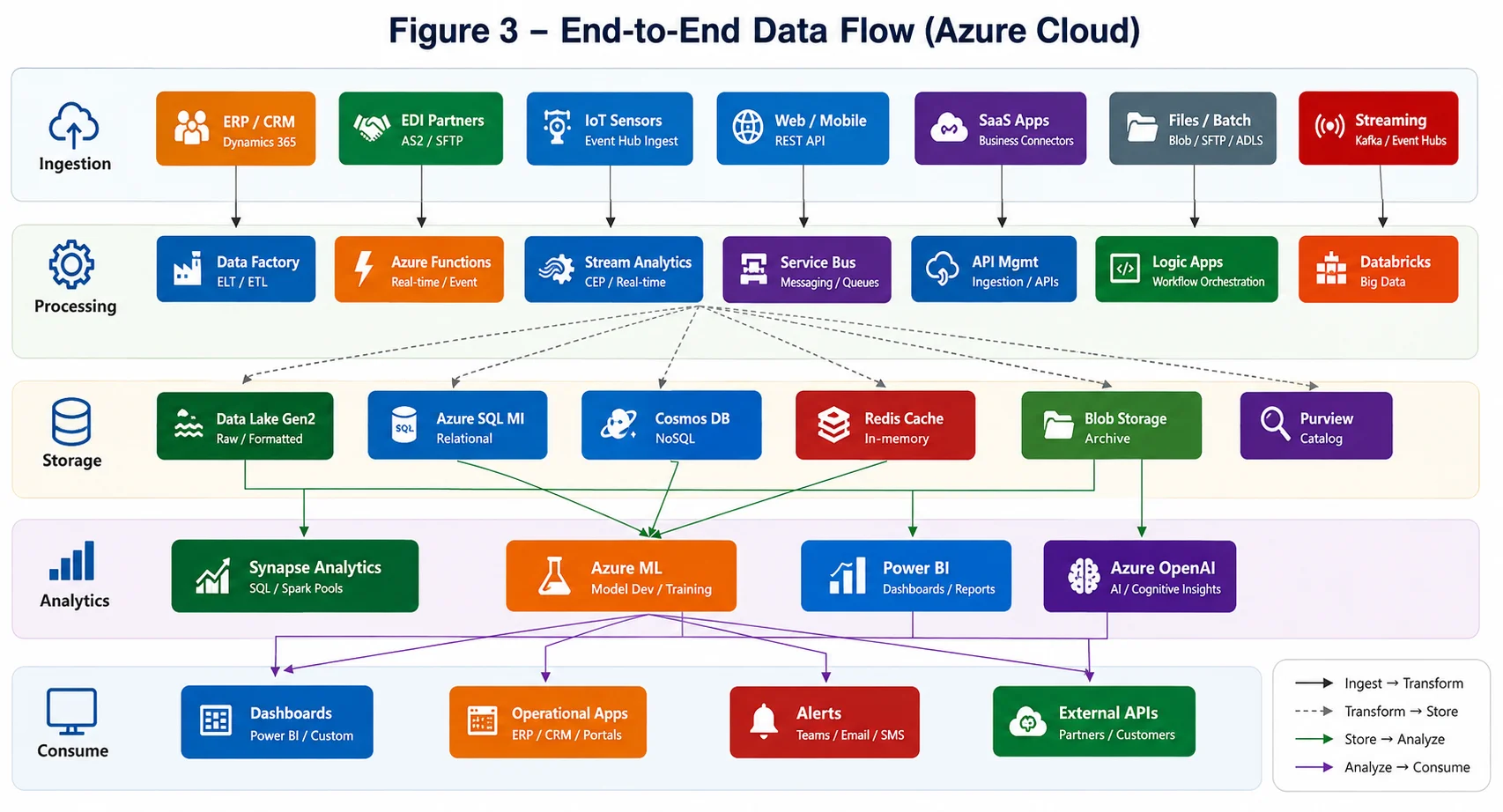
Data flows through five distinct layers — Ingestion, Processing, Storage, Analytics, and Consumption — each implemented as a managed Azure service tier. The architecture eliminates point-to-point integrations in favor of an event-driven, loosely-coupled data mesh pattern.
The data flow architecture supports three operational modes
- Real-time streaming — sub-second latency via Azure Event Hub and Stream Analytics for IoT and transactional event processing.
- Micro-batch processing — 5-minute SLA for EDI partner data and ERP change-data-capture feeds via Azure Data Factory.
- Batch / scheduled — overnight full-refresh pipelines for large-volume historical datasets stored in Data Lake Gen2.
Azure DevOps Automation
Azure DevOps Automation
The Azure DevOps CI/CD platform replaced the organization’s fragmented manual release process with a fully automated, auditable, and environment-gated deployment system. Every code commit flows through a multi-stage build pipeline before triggering an environment-promotion release pipeline that safely delivers changes to production with zero-downtime deployments.
- Release frequency
- Monthly → Multiple per day
- Lead time to deploy
- 6–8 weeks → < 2 hours
- Change failure rate
- 18% → 2.1%
- Mean time to restore (MTTR)
- 4 hours → < 20 minutes
Build Pipeline
Build Pipeline
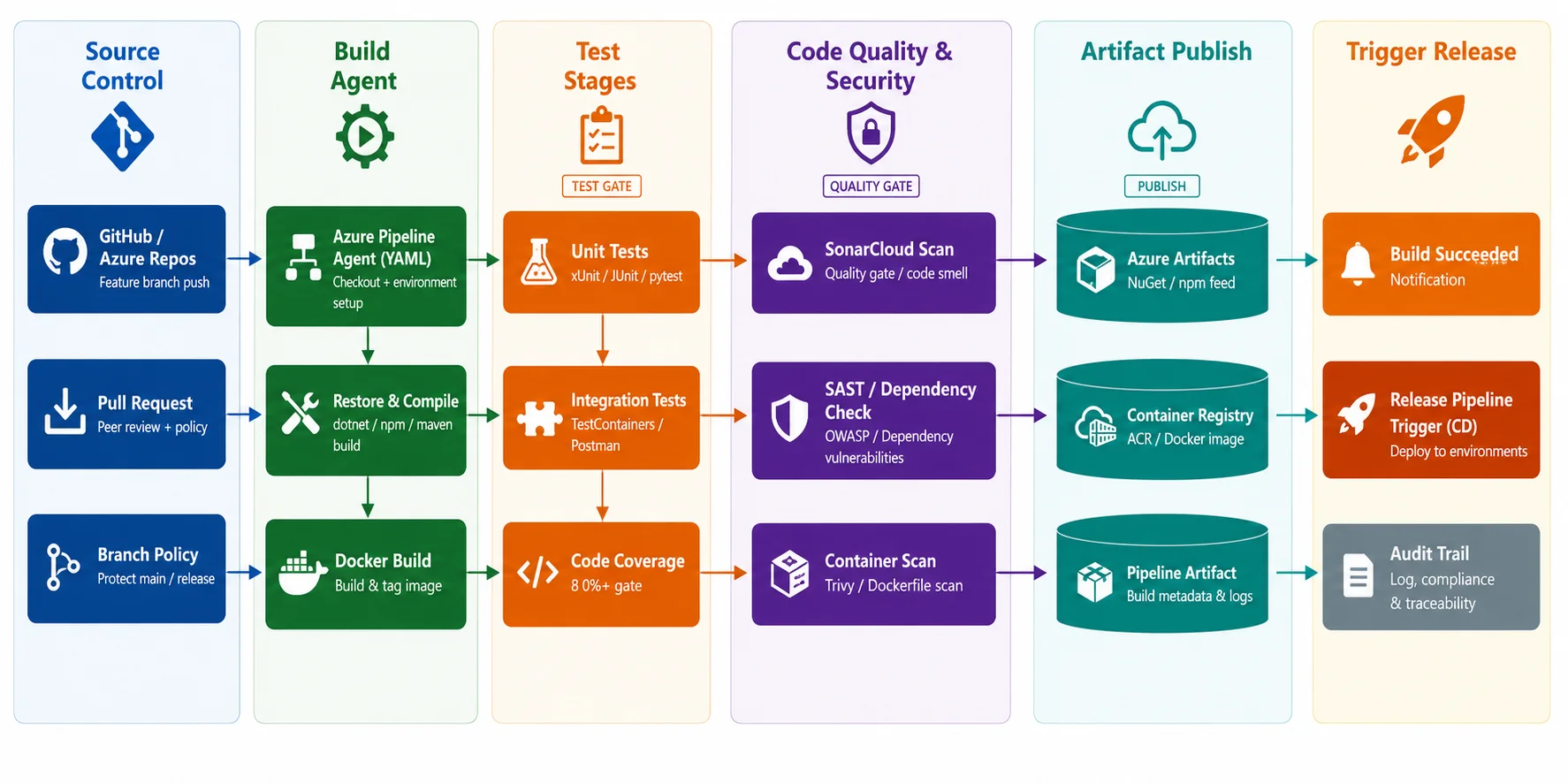
Every push to a feature branch or pull request to main triggers the CI build pipeline defined as YAML in the repository. The pipeline runs on Microsoft-hosted agents (Ubuntu 22.04) for standard workloads and self-hosted agents for workloads requiring access to private network resources. The pipeline enforces strict quality gates — a failed gate causes the build to fail, blocking the pull request merge and preventing a broken artifact from being published.
Build Pipeline Stage Details
Build Pipeline Stage Details
The table below describes each stage of the build pipeline, its trigger, the tasks it executes, the quality gate it must pass, and the Azure DevOps tooling used:
| Stage | Trigger | Steps / Tasks | Quality Gate | Azure DevOps Tools |
|---|---|---|---|---|
| Source Control |
Git push / PR to main or release/* branch |
Branch policy enforced; peer review required; linked work items validated; commit message convention checked |
Min. 1 reviewer approval; no open comments | Azure Repos (Git); Branch Policies; PR Checks |
| Build Agent | PR policy or CI trigger on merge | Restore packages (NuGet / npm / pip); compile application; build Docker image; tag with build ID + git SHA |
Build exits 0; Docker image created | Azure Pipelines YAML; microsoft-hosted agent (ubuntu-22.04); Docker |
| Unit Tests | Runs after successful build | Run unit test suite (xUnit / Jest / pytest); collect code coverage; publish test results to pipeline dashboard | All tests pass; coverage >= 80% | xUnit / Jest / pytest; Azure Pipelines Test Results; Cobertura coverage |
| Integration Tests |
Runs after unit tests pass |
Spin up test containers (SQL, Redis, Service Bus emulator); run API integration tests; validate contract tests (Pact) |
All integration tests pass; no schema regressions |
Test Containers; Postman / Newman; Pact broker |
| Code Quality |
Runs in parallel with integration tests |
SonarCloud static analysis; OWASP dependency check; Snyk vulnerability scan; licence compliance check |
SonarCloud Quality Gate: A; 0 critical CVEs; no GPL licence violations |
SonarCloud; OWASP Dependency-Check; Snyk; FOSSA |
| Container Security |
Runs after Docker build |
Trivy image scan; Microsoft Defender for Containers scan; sign image with Notary v2 / Cosign |
0 HIGH/CRITICAL CVEs in image; image is signed |
Trivy; Defender for Containers; Cosign; Azure Container Registry |
| Publish Artifact |
All prior gates pass |
Push Docker image to ACR; publish build artifact (IaC, Helm charts, migration scripts) to Azure Artifacts; publish SBOM |
Azure Container Registry; Azure Artifacts; SBOM tool |
|
| Trigger Release |
Artifact published successfully |
Auto-trigger Release Pipeline for DEV environment; send build summary to Teams; update linked JIRA / ADO work items to "Ready for Deploy" |
Release pipeline queued successfully |
Azure Pipelines Releases; Microsoft Teams webhook; Azure Boards |
Release Pipeline
Release Pipeline
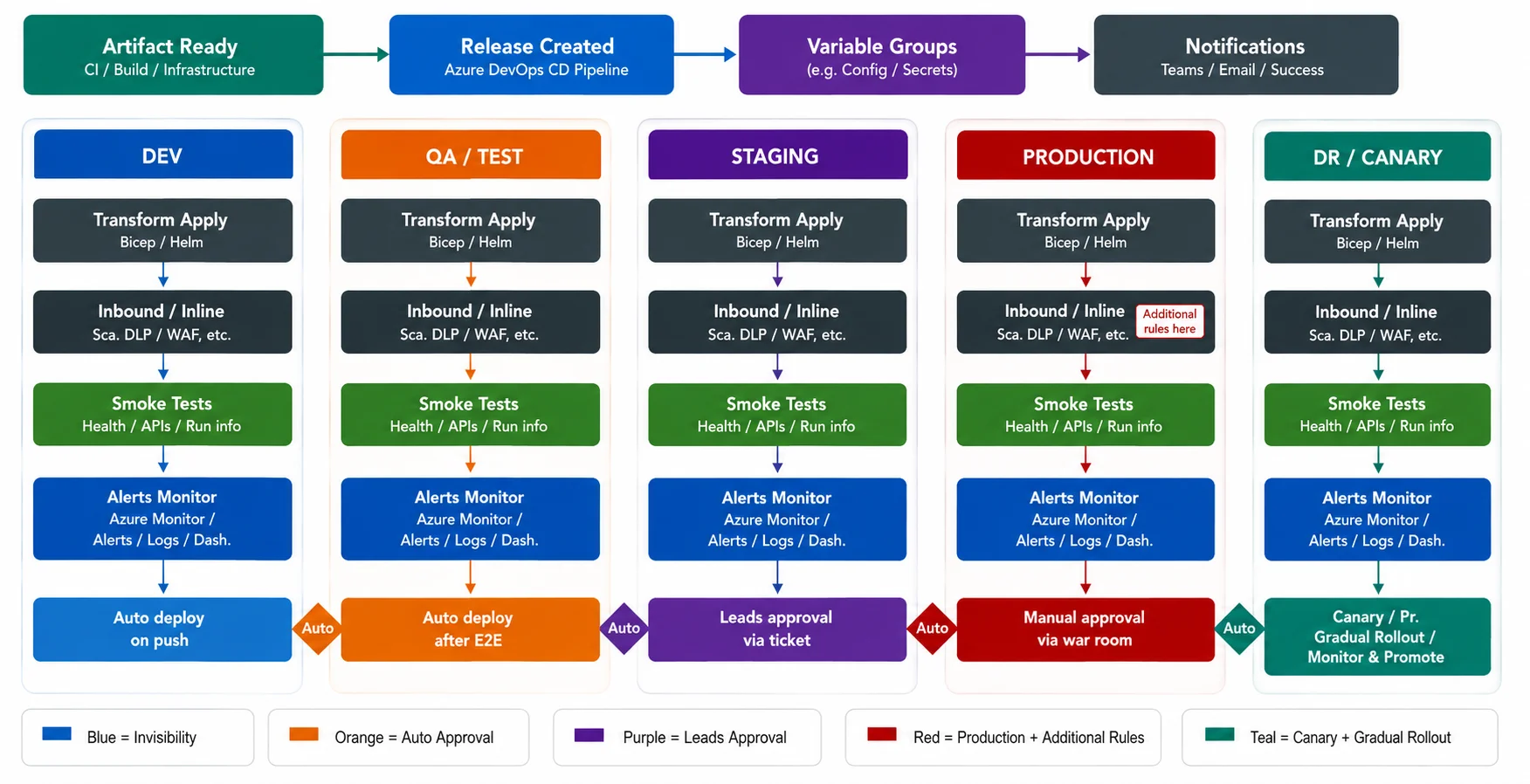
The release pipeline consumes the artifact produced by the build pipeline and promotes it through four environments — DEV, QA, Staging, and Production — with an optional DR/Canary ring for high-risk changes. Each environment stage includes Terraform-based infrastructure provisioning, Helm-based Kubernetes deployment, automated smoke tests, and an Azure Monitor health check before the promotion gate is evaluated. Environment-specific secrets are injected at runtime from Azure Key Vault via Azure Pipelines Variable Groups, ensuring no secrets are stored in pipeline YAML or code.
Environment Promotion Strategy
Environment Promotion Strategy
Each promotion gate combines automated health checks with human approval where warranted. The table below summarizes the deployment strategy, gate criteria, and rollback mechanism for each environment
| Environment | Approval | Deployment Strategy | Health Gates | Rollback |
|---|---|---|---|---|
| DEV | Auto-deploy on artifact publish |
Rolling update — immediate; 100% traffic to new version |
Smoke tests; HTTP 200 on /healthz; Azure Monitor baseline alert |
Auto-rollback on smoke test failure; < 2 min |
| QA / TEST |
Auto-deploy after DEV gates pass |
Rolling update; full regression suite runs post-deploy |
Full regression pass; Postman collection; performance baseline within 10% |
Auto-rollback on test failure; previous image redeployed |
| STAGING | 1-click approval (QA Tech Lead) |
Blue-green swap — new version deployed to green slot; traffic switched on approval |
Synthetic transactions; latency p99 < 800ms; error rate < 0.5% |
Blue-green swap back; < 5 min zero-downtime rollback |
| PRODUCTION | 2 approvers required (Eng Manager + Release Manager) |
Blue-green with canary ring — 10% traffic to new version for 15 min; full swap on pass |
Real user monitoring; Defender for Cloud; Azure Monitor SLO dashboard |
Auto-rollback if SLO breached during canary; Sentinel alert triggers rollback |
| DR / CANARY |
Triggered manually or by BCDR drill schedule |
Geo-failover to secondary Azure region; DNS switched via Azure Traffic Manager |
RPO/RTO verified; cross-region replication lag checked; full smoke suite |
Traffic Manager weighted routing fallback; < 15 min |
DevOps Toolchain
DevOps Toolchain
The following core Azure DevOps components and integrations form the automation backbone
- Azure Repos (Git): Mono-repo per service with branch policies enforcing signed commits, PR reviews, and linked work items. GitFlow branching strategy: feature/* → develop → release/* → main.
- Azure Pipelines (YAML): Multi-stage pipeline-as-code stored in the repository root. Templates shared across services from a central pipeline template repository, ensuring consistency and reducing duplication.
- Azure Artifacts: Private NuGet, npm, and Maven feeds used by all build agents. Upstream caching prevents builds from reaching the public internet, improving security and reliability.
- Azure Boards: Work items linked to commits and pull requests. Automated state transitions move items from “In Development” to “Ready for QA” to “Done” as pipeline stages complete.
- Azure Test Plans: Exploratory and manual test cases linked to user stories. Test results from automated pipelines are published to Test Plans for traceability and release sign-off reports.
- GitHub Advanced Security (GHAS): Secret scanning, code scanning (CodeQL), and Dependabot alerts integrated into every pull request.
- Key Vault + Variable Groups: Environment-scoped variable groups backed by Azure Key Vault references. Secrets are never stored in pipeline YAML — they are resolved at runtime with agent access controlled by Managed Identity.
- Service Connections: Azure Resource Manager service connections using Workload Identity Federation (OIDC) — no stored service principal secrets, eliminating a common credential leakage vector.
Migration Approach & Timeline
Migration Approach & Timeline
The 18-month program was divided into four sequential phases, each with defined entry criteria, exit criteria, and go/no-go governance gates.
| Phase | Activities | Duration | Key Milestone |
|---|---|---|---|
| Phase 1 Discover & Assess |
Azure Migrate assessment; dependency mapping; TCO analysis; stakeholder alignment; landing zone design; DevOps maturity assessment |
Months 1–3 |
Azure Landing Zone approved; migration backlog and CI/CD roadmap baselined |
| Phase 2 Foundation |
Hub-spoke VNet; ExpressRoute; Entra ID; Key Vault; Defender; ADO organization setup; YAML pipeline templates; IaC baseline (Bicep + Terraform) |
Months 3–6 |
Security baseline passed; first wave migrated; ADO pipelines live for 5 pilot services |
| Phase 3 Migrate & Modernize |
Wave-by-wave server migrations; AKS cluster buildout; SQL MI migration; Data Factory pipelines; Synapse deployment; CI/CD rollout to all 47 services |
Months 6–15 |
All production workloads on Azure with automated deployments; on-prem decommission started |
| Phase 4 Optimize & Operate |
Azure Cost Management tuning; FinOps governance; SRE runbooks; Sentinel SOAR playbooks; ADO self-service onboarding for new services; DORA metrics dashboard |
Months 15–18 |
All on-prem hardware decommissioned; DORA elite performer targets achieved |
Results & Business Outcomes
Results & Business Outcomes
The following metrics were measured 90 days post-migration against the pre-migration baseline:
| Metric | Before (On-Prem) | After (Azure |
|---|---|---|
| Infrastructure Cost (Annual) | $4.2M CapEx + OpEx |
$2.5M OpEx (−40%) |
| Application Availability |
99.5% (43 hrs downtime/yr) |
99.99% (<1 hr downtime/yr) |
| Deployment Frequency (DORA) |
Monthly releases Multiple deploys / day |
|
| Lead Time to Deploy (DORA) |
6–8 weeks |
< 2 hours (CI/CD) |
| Change Failure Rate (DORA) |
18% |
2.1% |
| Mean Time to Restore (DORA) |
4 hours |
< 20 minutes |
| Recovery Time Objective (RTO) |
8 hours |
< 15 minutes |
| Recovery Point Objective (RPO) |
4 hours |
< 5 minutes |
| Security MTTD |
18 hours |
< 2 hours (Sentinel) |
| New Env Provisioning Time |
4–6 weeks (manual) |
< 30 minutes (IaC + ADO) |
Key Takeaways & Lessons
Key Takeaways & Lessons
What Worked Well
- Pipeline-as-code from Day 1 — storing YAML pipelines in the repository alongside application code ensured pipelines evolved with the service and were version-controlled, reviewable, and auditable.
- Shared pipeline template library — a central ADO template repository enforced consistent quality gates, security scans, and artifact publishing across all 47 services without duplicating YAML.
- Landing zone first — 3 months invested in governance, networking, and security foundations prevented costly rework and security debt in later phases.
- DORA metrics as success criteria — measuring deployment frequency, lead time, change failure rate, and MTTR gave engineering leadership objective evidence of progress and motivated teams.
- Parallel-run database strategy — 4 weeks of live data validation in Azure SQL MI before cutover resulted in zero data integrity issues.
Challenges Encountered
- Legacy test suites not designed for CI — 23% of services had slow or flaky integration tests that initially made the CI pipeline unreliable. Investment in test refactoring was required before enforcing the coverage gate.
- Application dependency discovery was more complex than initially scoped — 23% of applications had undocumented dependencies that extended Phase 3 by 6 weeks.
- Developer upskilling on YAML pipelines and AKS required a structured enablement program — cloud champions in each product team were critical to accelerating adoption.
Recommendations
- Invest in pipeline template governance early — a central template library scales your CI/CD standards without creating a bottleneck team.
- Measure DORA metrics from Day 1 — they will reveal where your bottlenecks truly are (hint: it is rarely the build step).
- Treat pipeline security (OIDC, Key Vault integration, image signing) as a first-class requirement, not a post-launch hardening exercise.
- Run a DevOps maturity assessment alongside the cloud readiness assessment — the two must be co-designed to avoid migrating a broken delivery process to the cloud.
Conclusion
Conclusion
The successful migration of this enterprise’s entire IT estate to Microsoft Azure — paired with a fully automated Azure DevOps CI/CD platform — demonstrates that large-scale cloud modernization and delivery automation are inseparable. Infrastructure without deployment automation creates a faster environment for slow, risky releases; automation without the right cloud foundation creates pipelines that deploy to brittle infrastructure.
Together, the Azure cloud platform and Azure DevOps build and release pipelines have given this organization’s engineering teams the capability to ship value to customers continuously, confidently, and safely — transforming software delivery from a quarterly event into an everyday capability.